
Shopify Product Syncing
Outlined below is where each field syncs and on what basis.
Initial Sync:
Once a retailer selects a product, it will sync to their platform as long as the Suppliers has priced it. During the initial sync, all product details shown in the Modern Dropship dashboard will be sent to the retailer’s platform, except for fields marked as not synced. Inventory and price update in real time and will reflect on the retailer’s platform during the hourly sync.
Modern Dropship Product Data to Shopify Product Data Mapping:
Modern Dropship Product | Shopify Product |
Title | Title |
Description | Description |
Tags | Tags |
Attributes | Not Synced |
Images | Images |
Vendor | Vendor |
Type | Type |
Modern Dropship Variant Data to Shopify Variant Data Mapping:
Modern Dropship Product Variant | Shopify Product Variant |
Title | Title |
SKU | SKU |
Barcode | Barcode |
Barcode Type | Not Synced |
Retail Price | Price |
Option 1 - Name / Value | Option 1 - Name / Value |
Option 2 - Name / Value | Option 2 - Name / Value |
Option 3 - Name / Value | Option 3 - Name / Value |
Attributes | Not synced |
Weight Dimensions | Weight |
Weight Units | Weight units |
Height Dimensions | Not Synced |
Height Units | Not Synced |
Google Product Category - Code / Name | Not Synced |
Ongoing Syncing:
Below in green is what you are free to edit, what is in red cannot be edited without re-importing (if you are a supplier) or selecting it (if a retailer) in Modern Dropship.
When a retailer engages in any of the actions listed below, it can result in a product becoming broken (no longer mapped):
Duplicating a product in Shopify
Adding a variant in Shopify
Changing inventory locations in Shopify
When a supplier engages in any of the actions listed below, it can result in a product becoming broken (no longer mapped):
Removing a variant in Shopify
Deleting a product in Shopify
Duplicating a product in Shopify
Changing inventory locations in Shopify
If a product is deleted, duplicated, or has had variants added or removed by either partner, kindly contact support@moderndropship.com for assistance.
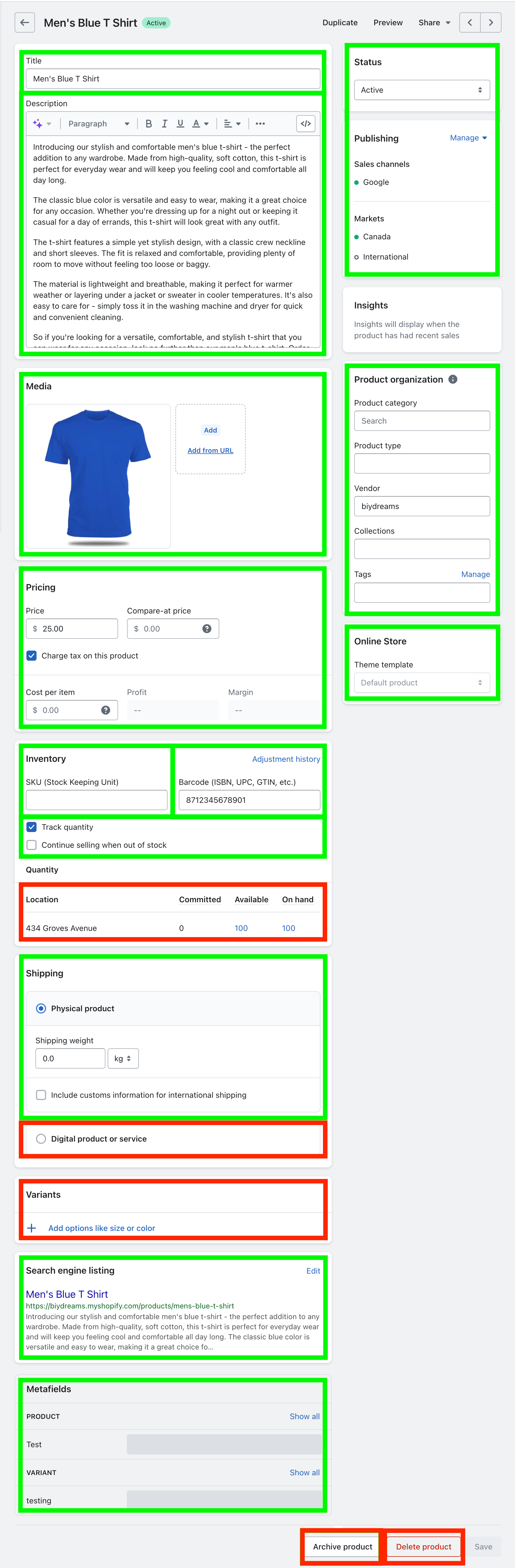
Note: As a retailer, only product inventory and price will continue to update after the initial selection process. Any time a product change is made by the Suppliers to a detail that is not one of the aforementioned fields, the retailer will need to manually update these details on their end, unless they have the relevant Autonomous Merchandising settings enabled, specifically Push Product Updates. Most ecommerce platforms will have an option to do this via bulk editor, or by using a CSV file if the buying and selling partners are on the same platform.