
Fixing SKUs in Scientific Notation
This guide helps resolve SKUs being converted to scientific notation. This issue arises when Importing Products.
Modern Dropship uses CSV templates to Import Products and Create Price Lists.
Both files require a supplier to list their Product SKUs. However, some spreadsheet editors such as Microsoft Excel can convert a supplier's SKUs to scientific notation.
Normal SKU: 4172043946189
Scientific Notation: 4.17+E12
It is recommended to edit your Product CSV in Google Sheets to avoid the issue Excel changing data formats
If you'd like to proceed with editing data in Excel, the below steps show how to resolve this issue.
Managing Column Width
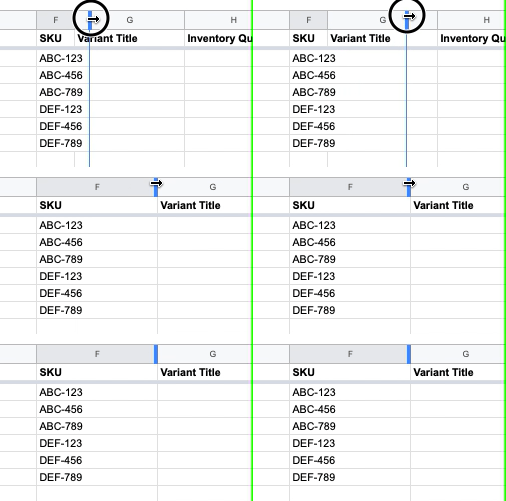
The first step is to ensure that your column for SKU is wide enough to display the full width of values. You can drag the column width to fix this.
Changing the Data
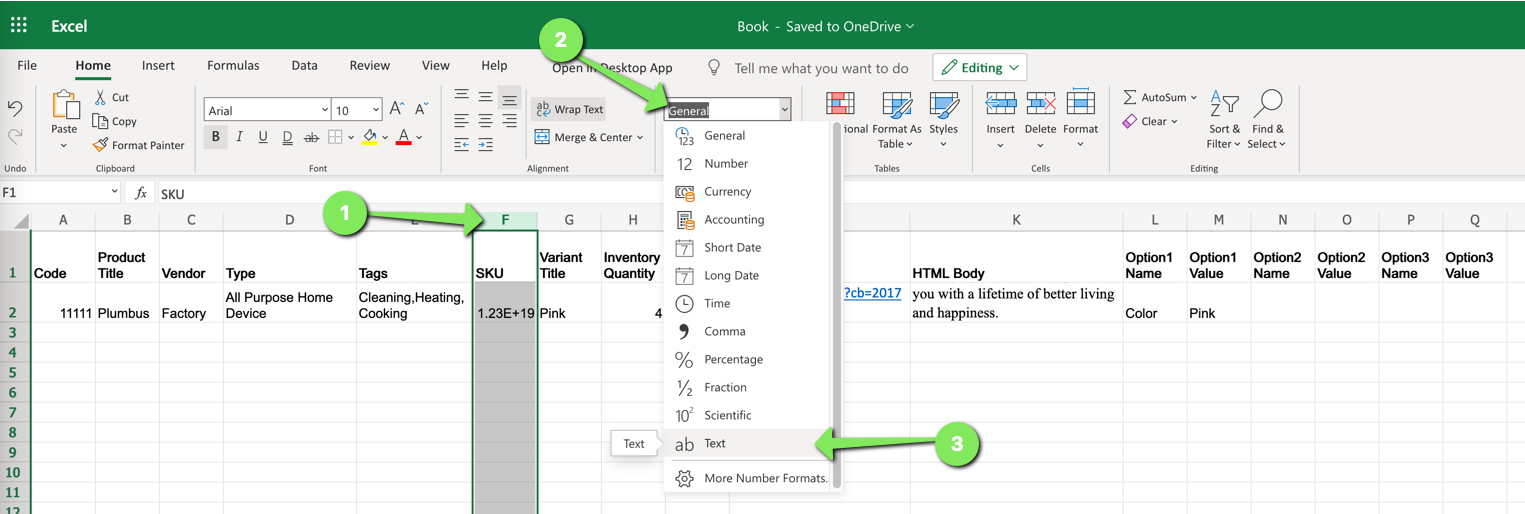
Once the column width is fixed, you can change the data type:
Select the column for SKU
Click the dropdown for the data type
Change the data type to Text
Confirming Success
To confirm success, you can open your CSV in a text editor like Notepad and search for "e+" and "E+".
If no values are returned, then your SKUs have not been saved in scientific notation.
Continuing On
Your Products CSV or Prices CSV should now contain accurate SKU information. Please proceed with uploading your file to the respective page (Products or Prices).
If issues persist, please contact support.